Companies
The Companies page is your central client directory. Each company has its own isolated space with documents, credentials, assets, and configurations.
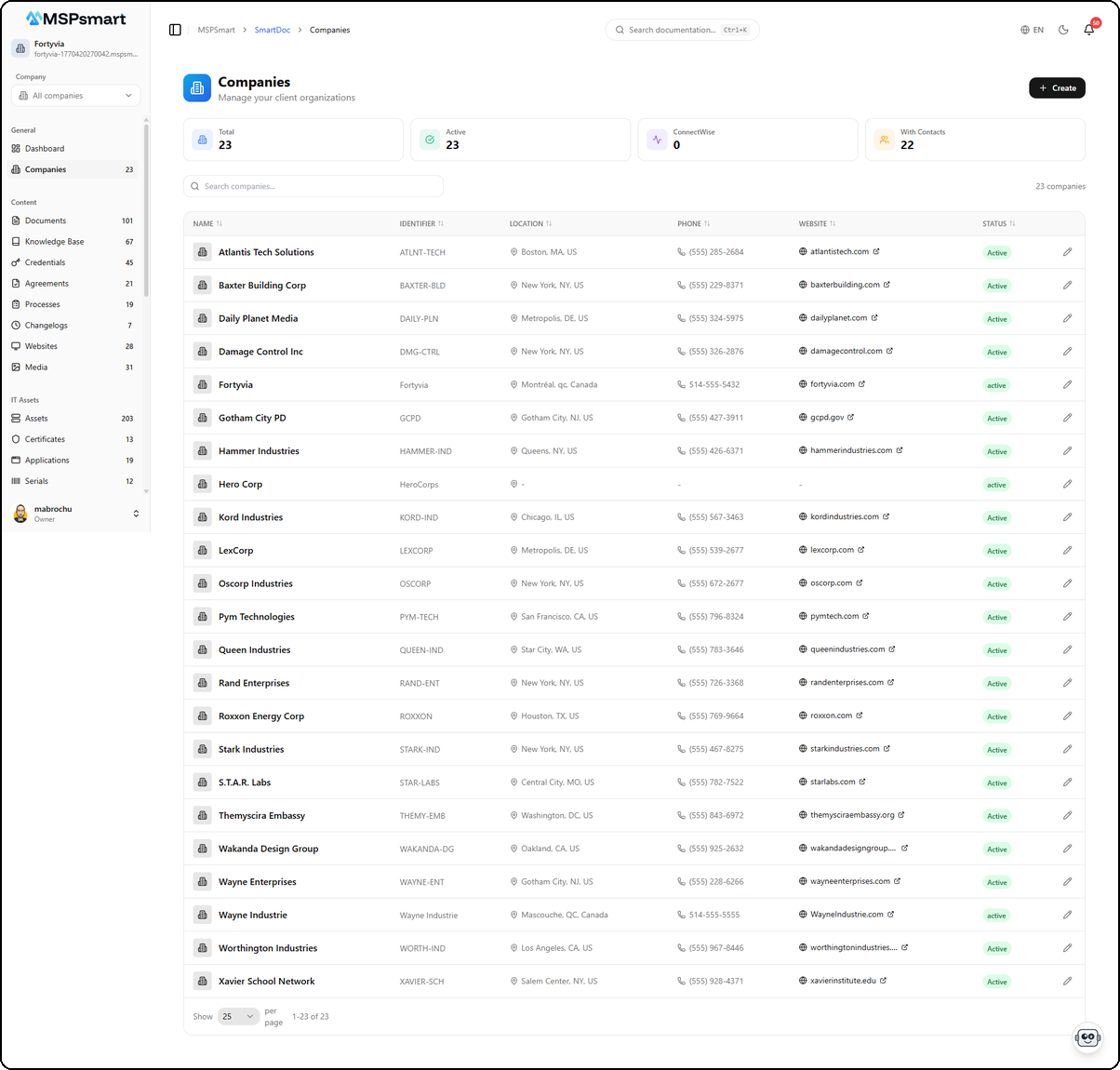
Company List
Companies are displayed as a table with pagination (25 per page). Each row shows:
| Column | Description |
|---|---|
| Name | Company name with logo |
| Identifier | Unique identifier code |
| Location | City and country |
| Phone | Main phone number |
| Website | Company website (clickable link) |
| Status | Status badge (active) |
Header Statistics
Four statistics cards at the top of the page display a global overview:
- Total — Total number of companies
- Active — Active companies
- ConnectWise — Companies synced from ConnectWise
- With Credentials — Companies with credentials in the vault
Search and Sort
- Search bar with real-time filtering by company name
- Total count displayed on the right (e.g., "23 companies")
- Pagination at the bottom of the table
Create a Company
The + Create button in the top right opens the form to create a new company.
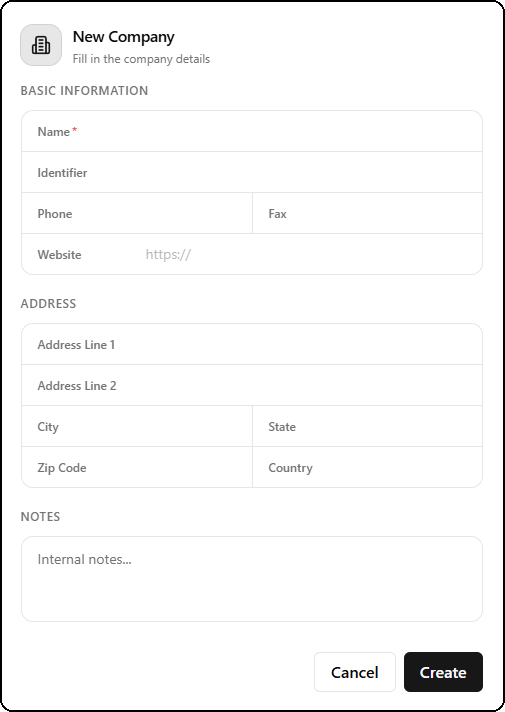
The form includes three sections:
Basic Information
| Field | Required | Description |
|---|---|---|
| Name | Yes | Company name |
| Identifier | No | Unique identifier code (e.g., client code) |
| Phone | No | Phone number |
| Fax | No | Fax number |
| Website | No | Website URL (https:// prefix) |
Address
| Field | Description |
|---|---|
| Address Line 1 | Primary address |
| Address Line 2 | Secondary address |
| City | City |
| State | State / Province |
| Zip Code | Postal code |
| Country | Country |
Notes
Free text field for internal notes about the company. These notes are only visible to SmartDoc users and are not shared with the client.
Import from ConnectWise
The Import button allows you to add clients directly from your ConnectWise Manage PSA. This feature automatically synchronizes basic client information.
Import Process
- Click Import in the toolbar
- The list of ConnectWise companies not yet imported is displayed
- Use the search bar to find a specific client
- Select one or more clients (or "Select All" for batch import)
- Click Import to start synchronization
Synced Data
When importing from ConnectWise, the following data is automatically retrieved:
- Company name
- ConnectWise identifier
- Full address
- Phone number
- Website
- Primary contacts
Post-Import Behavior
- Imported companies are linked to their ConnectWise equivalent
- Updates in ConnectWise are automatically synchronized based on configuration
- The Edit button is disabled for fields synced from ConnectWise to avoid data conflicts
- Non-synced fields (notes, SmartDoc configuration) remain editable
Access a Company Dashboard
Click a table row to access the client's dedicated Company Dashboard. This dashboard displays all metrics, documents, credentials, and configurations specific to this client.
For more details, see the Company Dashboard page in the left menu.