Processes
The Procedures module is a complete runbook and structured task management system. It lets you define business processes with hierarchical tasks, dependencies, conditional logic, and visual progress tracking.
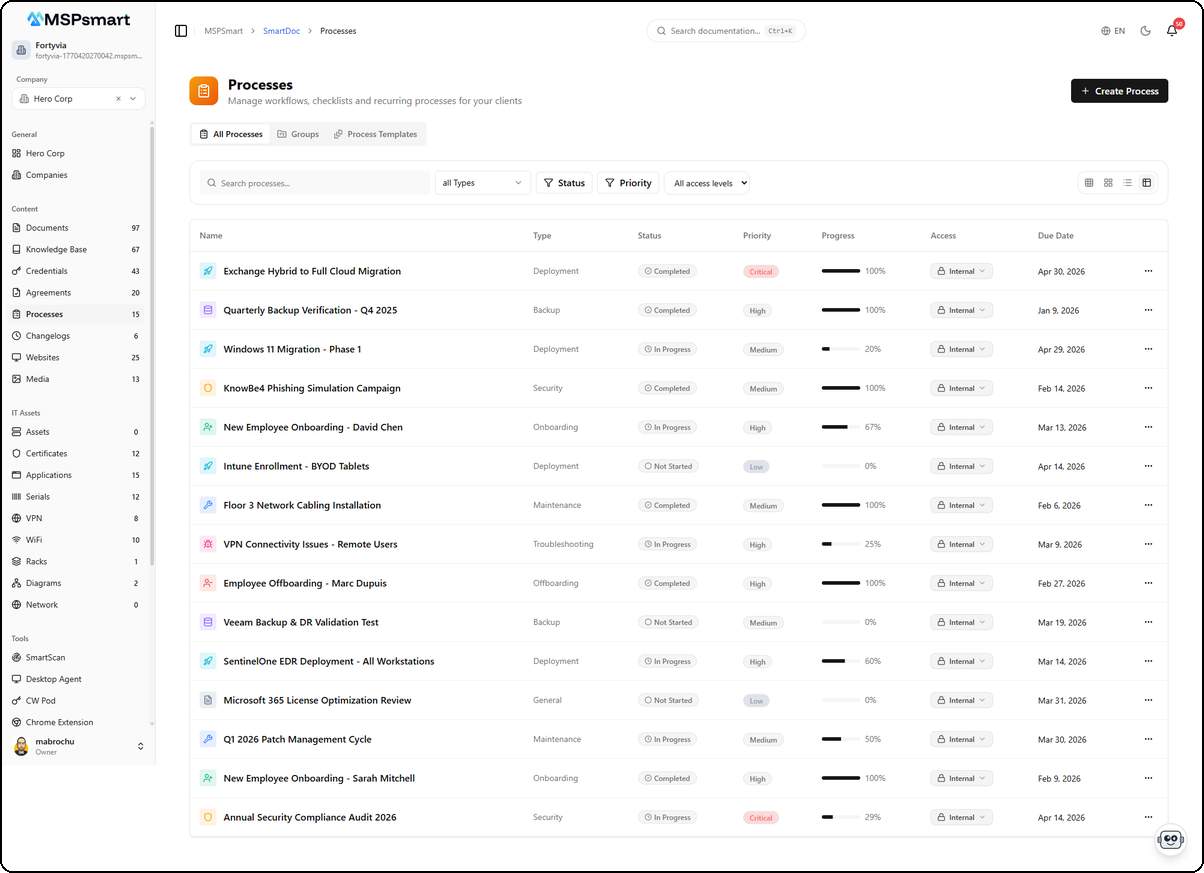
Process List
The main page displays all procedures in a table view with the following columns:
| Column | Description |
|---|---|
| Name | Process name with type icon |
| Type | Category (Deployment, Backup, Maintenance, Security, Onboarding...) |
| Status | Not Started, In Progress, Completed, Cancelled, On Hold, Blocked |
| Priority | Low, Medium, High, Critical (colored badge) |
| Progress | Progress bar with percentage (completed tasks / total) |
| Access | Access level (Internal, Client) with dropdown |
| Due Date | Deadline, displayed in red if overdue |
Tabs
Three tabs organize the content:
- All Processes — View all individual processes
- Groups — View process groups (Kanban, table, timeline)
- Process Templates — Template library
Filters and Sorting
- Real-time search by name
- Type: filter by process category
- Status: filter by progress state
- Priority: filter by priority level
- Access level: Internal or Client
- Sort: by name, due date, created date, progress, priority, status
- Pagination: 20 items per page
Create a Process
The + Create Process button opens a creation form.
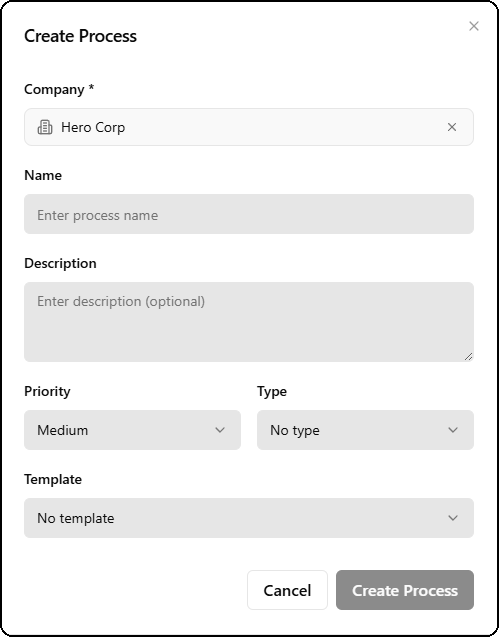
| Field | Required | Description |
|---|---|---|
| Company | Yes | Associated company (e.g., Hero Corp) |
| Name | Yes | Process name |
| Description | No | Optional description |
| Priority | No | Priority: Low, Medium (default), High, Critical |
| Type | No | Process category (Deployment, Backup, Maintenance, etc.) |
| Template | No | Base template to pre-fill tasks |
Selecting a template automatically pre-fills tasks, sub-tasks, and estimated durations. This is the fastest way to start a new process.
Process Detail
Clicking a process opens its detail view with the task list.
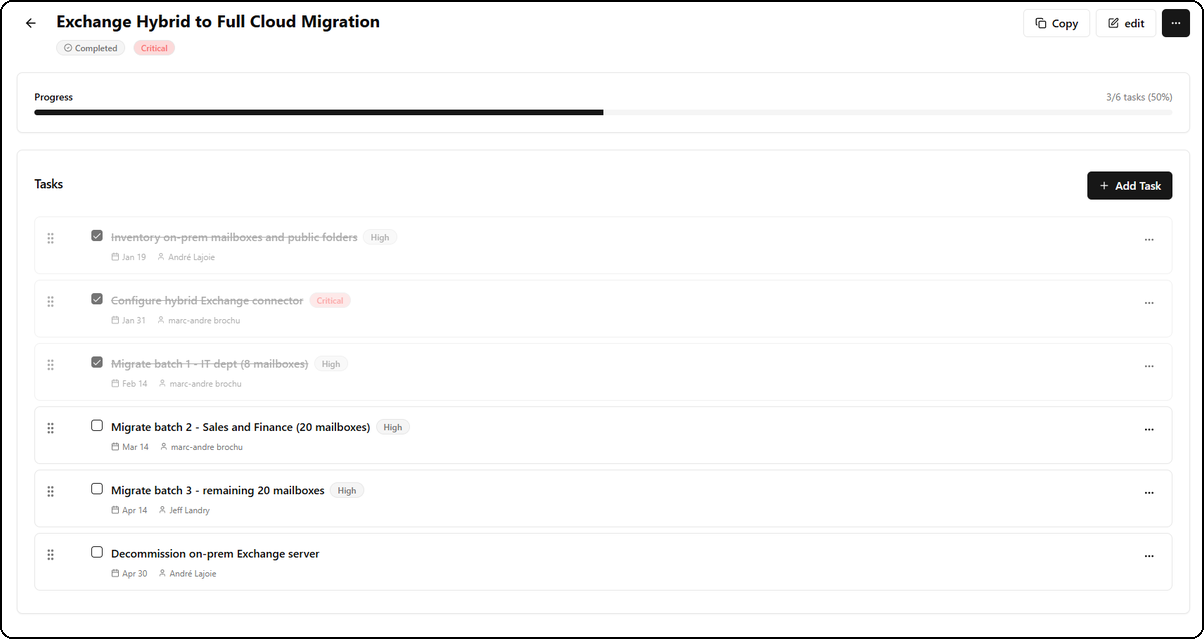
The header displays:
- Title of the process (e.g., "Exchange Hybrid to Full Cloud Migration")
- Badges: status (Completed) and priority (Critical)
- Progress bar: completed tasks / total with percentage (e.g., 3/6 tasks, 50%)
- Actions: Copy, Edit buttons and context menu (...)
Task List
Each task displays:
- Checkbox — Mark the task as completed (grayed out and strikethrough when done)
- Title of the task
- Priority badge — High, Critical, Medium, etc.
- Due date — Calendar icon with date
- Assignee — Name of the responsible user
- Context menu (...) — Additional actions
- Drag handle — Six-dot icon for drag-and-drop reordering
Completed tasks appear with a light green background, checked box, and strikethrough text.
+ Add Task Button
The + Add Task button at the top-right of the section allows adding new tasks to the process.
Process Groups
Groups let you organize multiple processes under a common theme (e.g., "Onboarding") and offer three visualization modes.
Create a Group
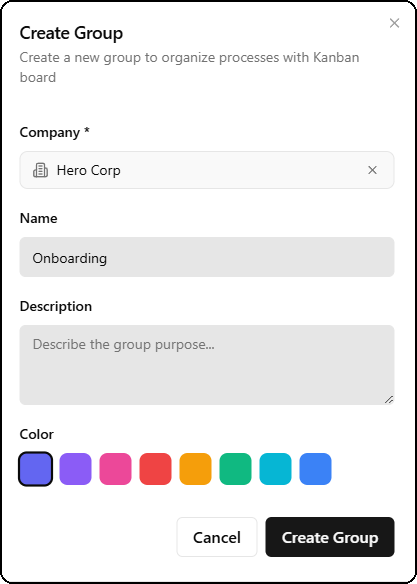
The group creation form contains:
| Field | Required | Description |
|---|---|---|
| Company | Yes | Associated company |
| Name | Yes | Group name (e.g., Onboarding) |
| Description | No | Description of the group purpose |
| Color | No | Identification color (8 options: purple, indigo, pink, red, orange, green, cyan, blue) |
Add Processes to a Group
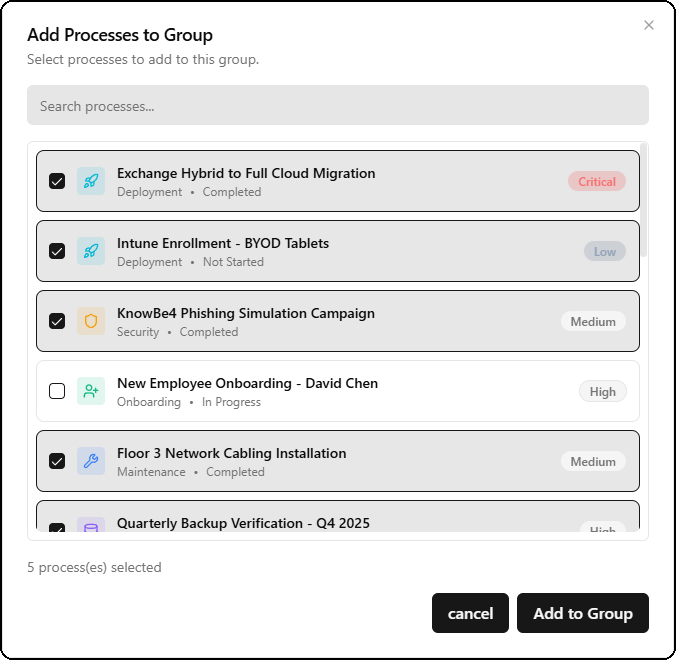
The Add Processes to Group dialog shows:
- A search bar to filter processes
- The list of available processes with checkboxes
- For each process: name, type, status, and priority badge
- A counter at the bottom (e.g., "5 process(es) selected")
- Cancel and Add to Group buttons
Group Header
Each group displays a header with:
- Group name with icon
- Badges: status (active), access level (Internal), company (Hero Corp)
- Overall progress bar with counter (e.g., 2/5 processes, 40%)
- + Add Process button and context menu (...)
Group Views
Three visualization modes are available via icons at the top-right:
Kanban View
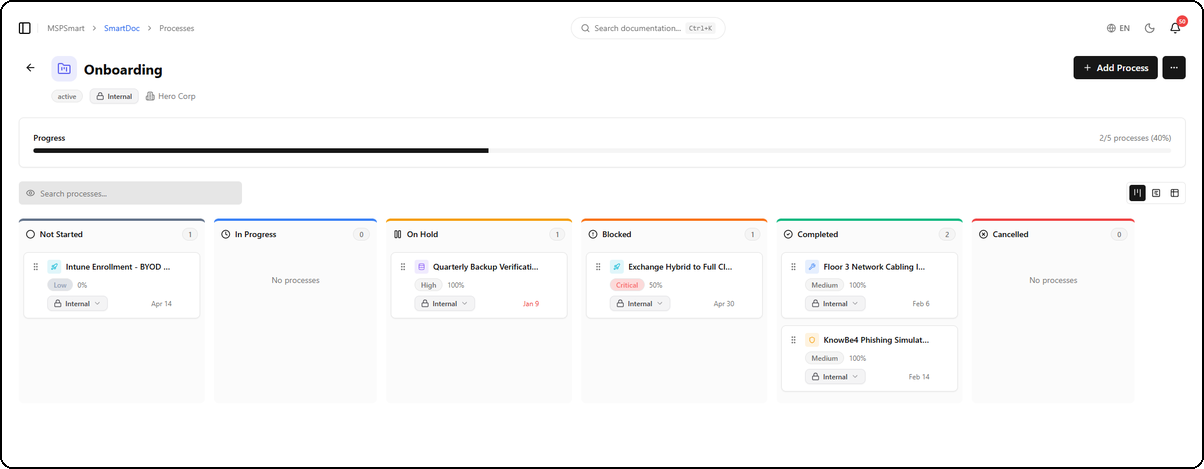
The Kanban view organizes processes into columns by status:
| Column | Description |
|---|---|
| Not Started | Processes not yet started |
| In Progress | Processes currently underway |
| On Hold | Processes on hold |
| Blocked | Blocked processes |
| Completed | Finished processes |
| Cancelled | Cancelled processes |
Each card displays:
- Type icon and name of the process
- Priority and progress percentage
- Access level with dropdown
- Due date
- Drag handle to move between columns
- Each column shows its counter (e.g., "2")
Table View
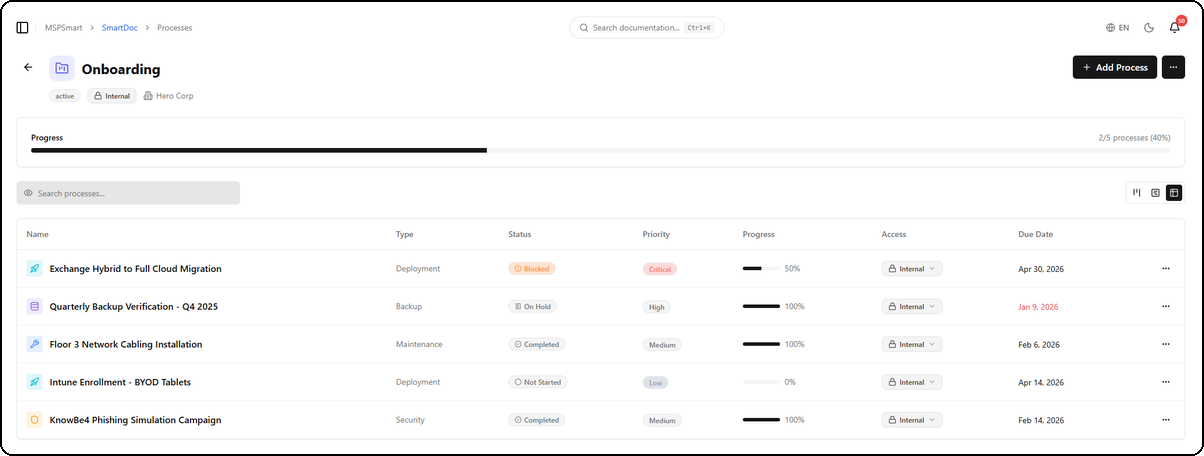
The table view displays the group's processes in a table with the same columns as the main list (Name, Type, Status, Priority, Progress, Access, Due Date). Overdue dates are displayed in red.
Timeline View
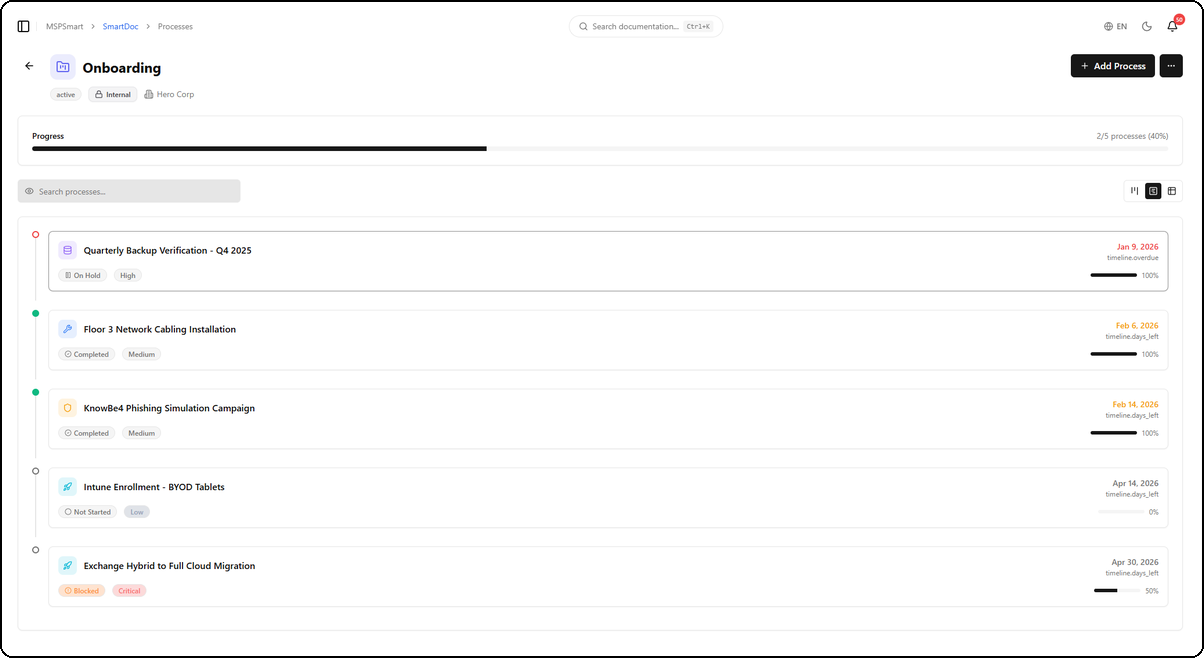
The timeline view displays processes vertically in chronological order:
- Colored dot on the left indicating the state:
- Red: overdue
- Green: completed
- Gray: not started or in progress
- Card with type icon, name, status and priority badges
- Due date on the right with indicator:
timeline.overdue— Overduetimeline.days_left— Days remaining
- Progress bar with percentage
Process Properties
| Property | Description |
|---|---|
| Name | Bilingual (FR / EN) |
| Description | Bilingual (FR / EN) |
| Company | Assigned client |
| Type | Process category |
| Priority | Low, Medium, High, Critical |
| Status | Not Started, In Progress, Completed, Cancelled, On Hold, Blocked |
| Owner | Assigned user |
| Due date | Deadline |
| Access level | Internal or Client |
| Portal visible | Visibility on the client portal |
Task System
Each process contains hierarchical tasks (parent-child with sub-tasks).
Task Types
| Type | Usage |
|---|---|
| Standard | Classic task to complete |
| Checkbox | Simple yes/no validation |
| Decision | Choose between multiple options |
| Approval | Requires manager validation |
| File upload | Document upload required |
| Signature | Electronic signature required |
| Note | Information or comment |
Task Properties
- Bilingual title (FR / EN)
- Bilingual description
- Individual priority and status
- Estimated vs. actual time (in minutes)
- User assignment
- Individual due date
- Sort order (drag-and-drop reordering)
Advanced Features
- Dependencies — A task can depend on another task's completion
- Conditional logic — Show a task only if another task has a specific value
- Sub-tasks — Unlimited hierarchical nesting
Process Templates
Pre-built templates speed up creation:
- System and custom templates
- Pre-defined tasks with sub-tasks
- Task types, estimated durations, default assignments
- Relative delays (days after start)
- Categories and tags
Audit Trail
All operations are logged: creation, modification, deletion, status changes — with user and before/after values.